 Hearsay
 The AI builder drafts a survey from a plain description and lets you change it by asking.
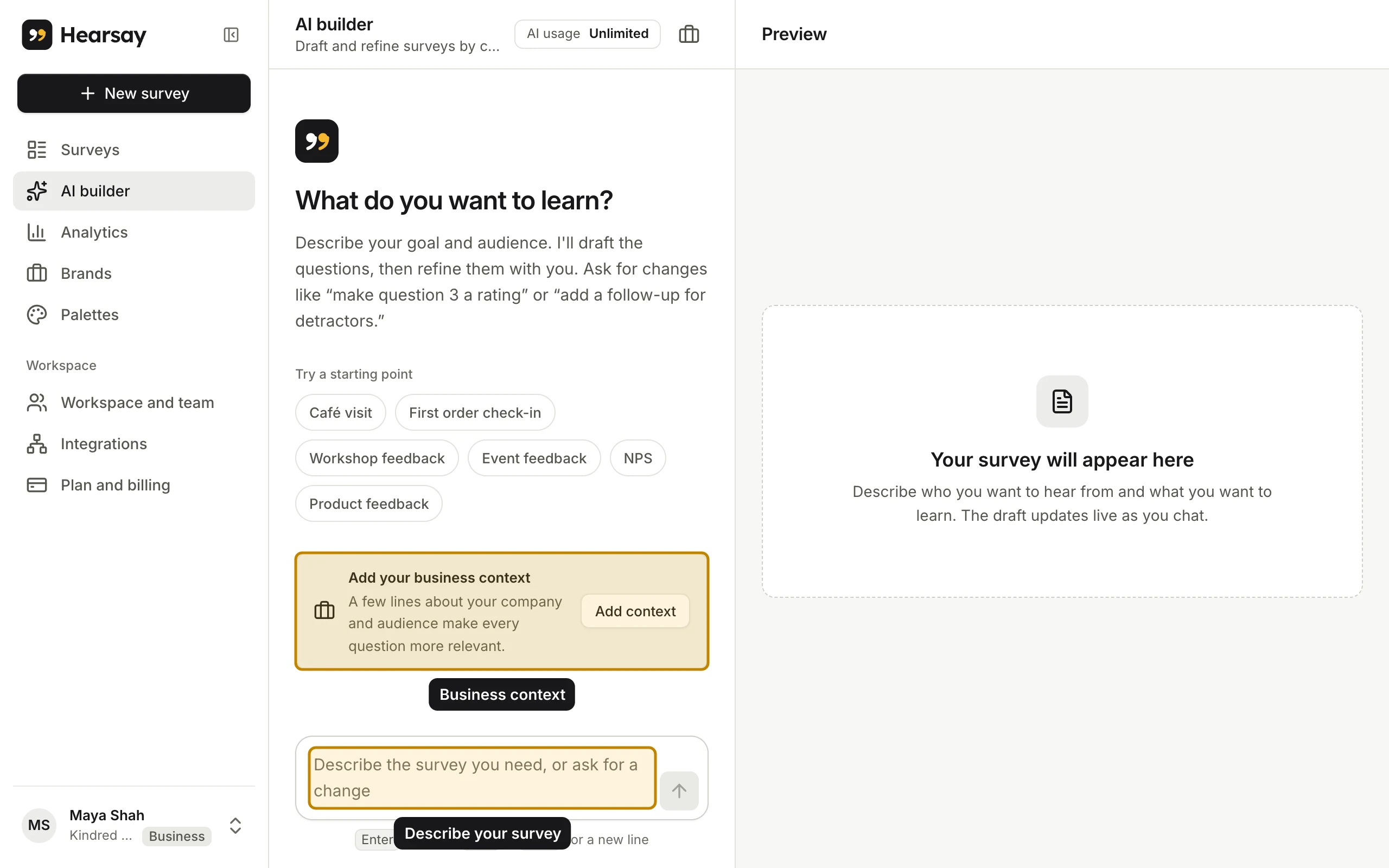
Draft a survey
- Choose New survey → Build with AI, or AI builder in the sidebar.
- Type what you want to learn, for example "Ask customers who picked up a coffee order how it went and whether they'd come back". Or click a starting point under Try a starting point.
- Press Enter to send (Shift+Enter adds a new line). The draft appears on the right, usually 4 to 10 questions.
- Ask for changes in the same chat: "make question 3 a rating", "add a question about price", "shorter, please".
- When it looks right, choose Save survey. It's saved as a draft. Choose Open in editor to fine-tune it, or Publish survey to put it live.
Give it your business context
Choose Add your business context and describe your company, industry and customers, then Save context. The AI uses it in every draft. Your brand's About this business text is used the same way; see Brands, palettes and logos.
How many AI requests you get
Each message you send is one AI request.
| Plan | AI requests per month |
|---|---|
| Free | 10 |
| Pro, Business, Enterprise | Unlimited |
The AI usage meter shows how many you've used. On Free, when you reach 10, Hearsay says AI usage limit reached until the 1st of next month, or until you upgrade. Fit it to my business on a template uses requests from the same allowance.