 Hearsay
 Embedding shows your survey on your own website. Customers answer without leaving the page, and responses are counted under the Website embed channel unless you pick another.
Get the code
- Open the survey's Share and channels dialog and choose Embed on your website. (The survey must be published: the embed always shows the published version.)
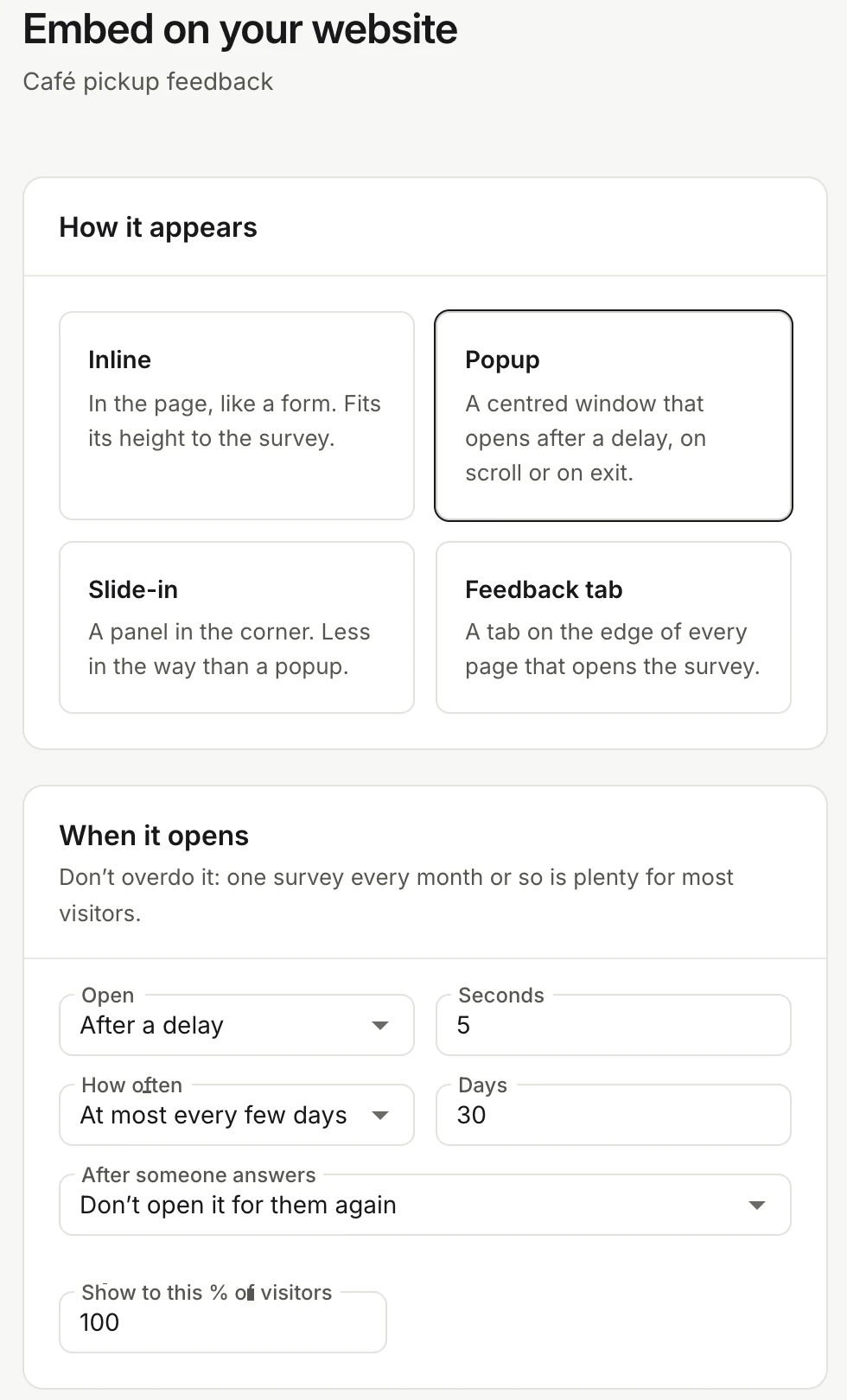
- Under How it appears, pick a style:
- Inline: in the page, like a form. It fits its height to the survey.
- Popup: a centred window that opens after a delay, on scroll or when someone is about to leave.
- Slide-in: a panel in the corner, less in the way than a popup.
- Feedback tab: a tab on the edge of every page that opens the survey.
- Set the options (below), check the Preview, then choose Copy code.
- Paste the code before
</body>on your site.
Inline works on every plan. Popup, slide-in and feedback tab are on Pro and above.
When it opens
For popups and slide-ins:
- Open: After a delay (5 seconds by default), When they scroll down (50% by default), When they're about to leave (desktop), As soon as the page loads, or Only from your code.
- How often: Every visit, Once per visit, At most every few days (30 days by default) or Only once.
- After someone answers: Don't open it for them again, or Open again after some days.
- Show to this % of visitors, to ask only some of them.
Don't overdo it: one survey every month or so is plenty for most visitors.
Where it shows
For everything except inline, Only on pages and Never on pages take paths like /checkout/*. Use * as a wildcard and separate paths with commas. Position puts it at the bottom right or left (or the right or left edge for a tab), and a tab has its own Tab text (up to 40 characters) and Colour.
Tracking
Pick the Channel responses count under. The address of the page someone answered on is saved with each response (without its query string, except utm_ tags), so you can filter results by Page URL.
The code
An inline survey looks like this:
<div data-survey="SURVEY_ID"></div>
<script src="https://hearsay.co.in/e/v1/embed.js" async></script>
A popup is a single script tag with its settings:
<script src="https://hearsay.co.in/e/v1/embed.js" data-survey="SURVEY_ID"
  data-mode="popup" data-trigger="scroll:50" data-frequency="days:30"
  data-include="/checkout/*" async></script>
| Setting | Values |
|---|---|
data-mode |
inline, popup, slider, tab |
data-trigger |
delay:5, scroll:50, exit (desktop only), load, manual |
data-frequency |
always, session, days:30, once |
data-after-submit |
hide, or days:90 to ask again later |
data-sample |
Percentage of visitors, e.g. 25 |
data-include, data-exclude |
Paths, with * as a wildcard |
data-source |
The channel name |
data-hidden-<field> |
A value for a link field, e.g. data-hidden-plan="pro" |
data-position, data-label, data-color |
Placement, tab text and tab colour |
Open it from your own code
With Only from your code (data-trigger="manual"), open the survey yourself and pass details about the visitor:
window.SurveyEmbed = window.SurveyEmbed || [];
SurveyEmbed.push(['open', 'SURVEY_ID', { mode: 'popup', hidden: { plan: 'pro' } }]);
SurveyEmbed.push(['on', 'submit', (event) => console.log('Answered', event)]);
Can't add scripts?
Under the inline code, Can't add scripts? A plain iframe (fixed height) gives you an iframe you can paste into any site builder.
Privacy and security
- Your page never sees the answers or coupon codes; the survey runs in its own frame.
- Link field values you pass go after the
#in the frame's address. - "One response per device" is remembered per website.
- If your site uses a Content Security Policy, allow
https://hearsay.co.ininscript-srcandframe-src.