 Hearsay
 Templates are finished surveys for the moments that decide whether a customer comes back: the first order, a late delivery, a cancellation. Each one comes with a suggested coupon and where to send it.
Pick a template
- Choose New survey → From a template, or go to Templates.
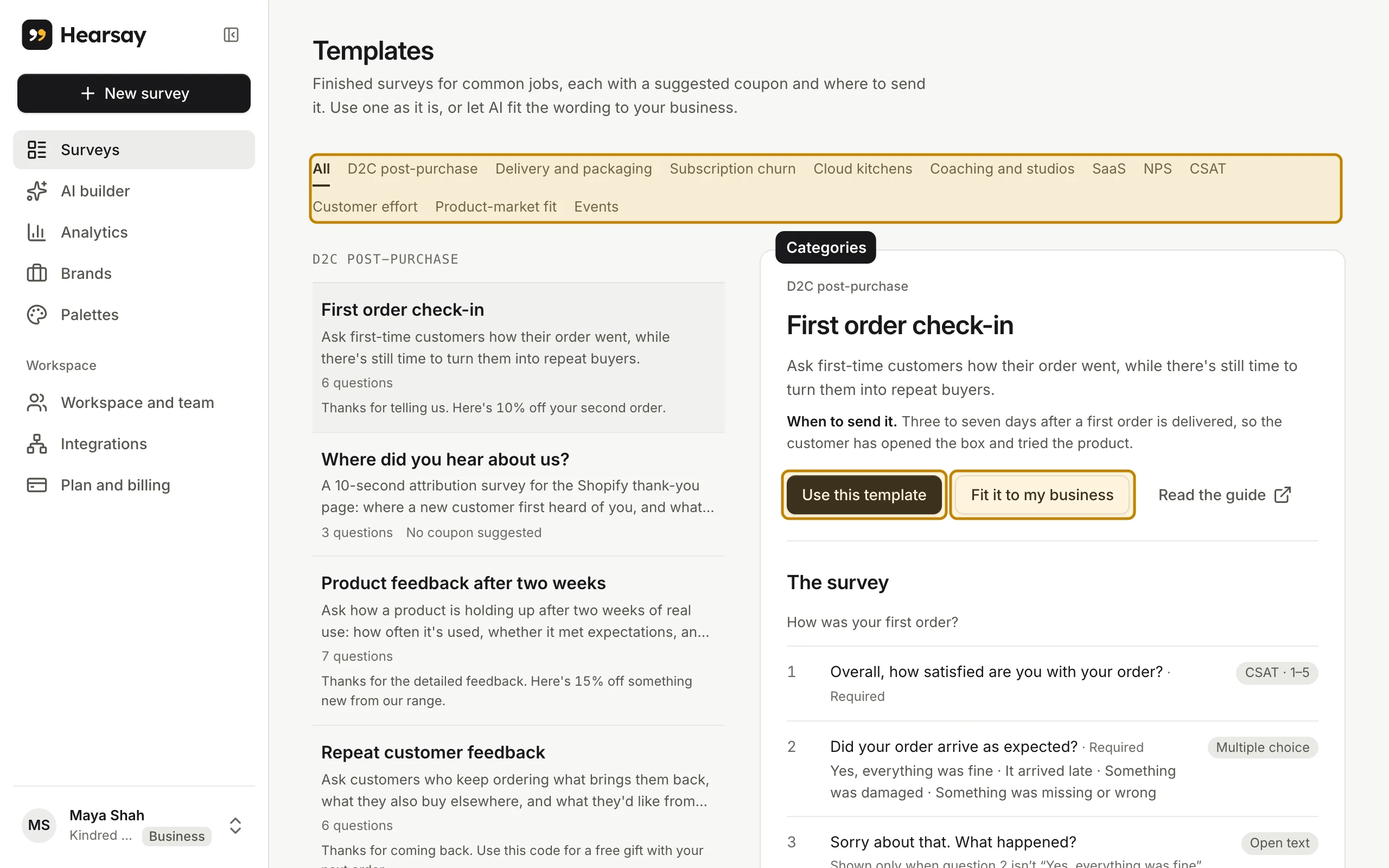
- Pick a category: D2C post-purchase, Delivery and packaging, Subscription churn, Cloud kitchens, Coaching and studios, SaaS, NPS, CSAT, Customer effort, Product-market fit or Events. All shows every template.
- Click a template to preview it. You'll see When to send it, The survey (every question), the Suggested coupon and Where to send it.
Use it
You have two choices:
- Use this template copies the survey into your workspace exactly as written.
- Fit it to my business has AI rewrite the wording for your business. The questions and logic stay the same. This uses one AI request; see Monthly limits for how many your plan includes.
If your workspace has more than one brand, Hearsay first asks Which brand is this survey for?
The survey opens in the editor with a note about where it came from. Review the questions, replace any placeholders, and publish when you're ready.
Read the guide on a template opens its public page with more on when to send it, why these questions, and what to do with the answers.
Changing it later
A survey made from a template is your own copy. Editing it never changes the template, and template updates never change your survey.